
Manage Every Recipient's Access, Permissions, and Activity in One Place
Full Control Over Content Access
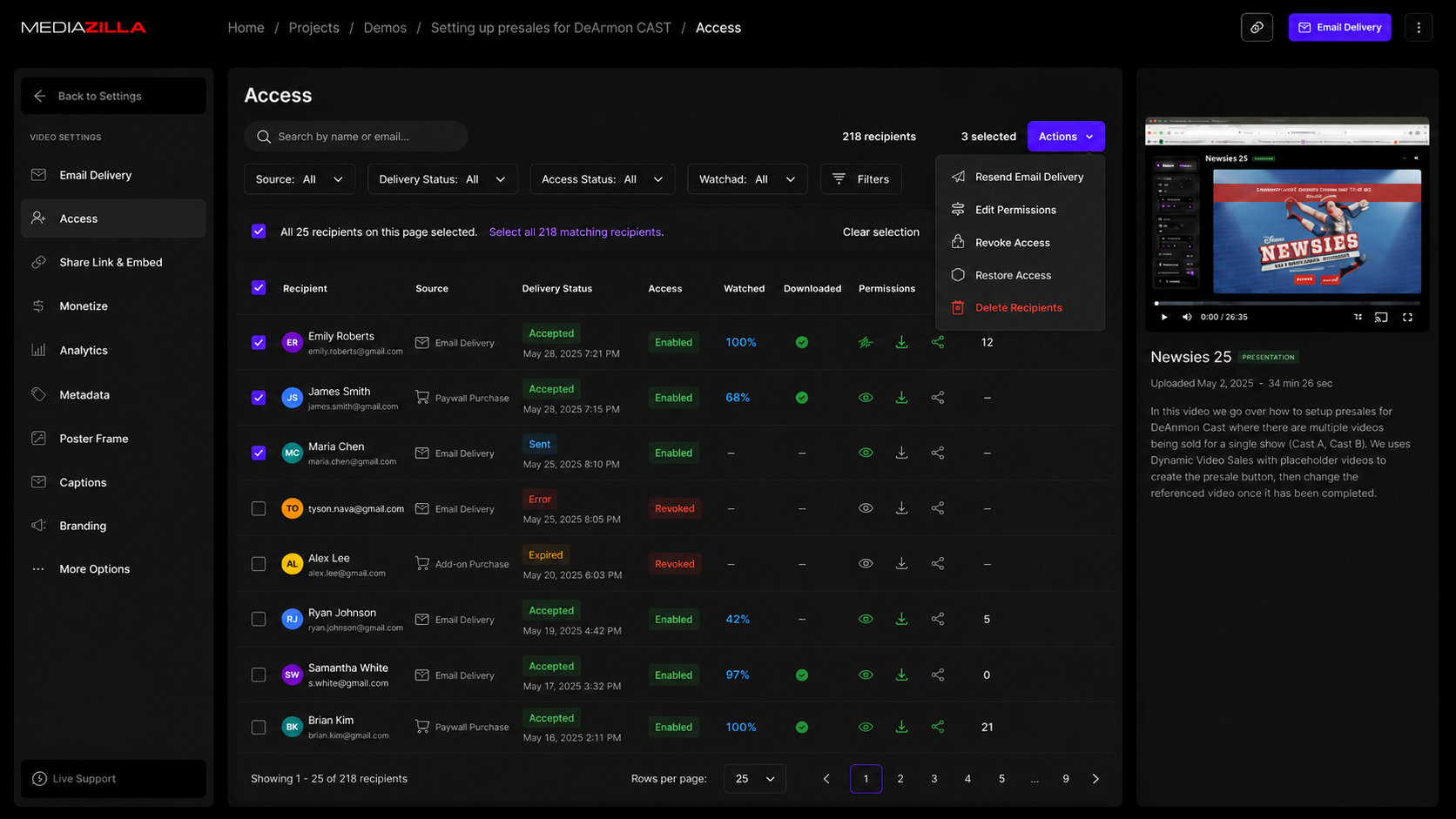
MediaZilla now gives you a complete, dedicated view of everyone who has access to a specific presentation or video, right from that content's Access page. Instead of piecing together delivery status, permissions, and viewer activity from separate places, you can now see and manage every recipient for that piece of content in one screen.
What You Can See for Every Recipient
The Access page shows a full picture of each recipient's relationship to your content:
- Source of Access - Know whether a recipient got access through a manual Email Delivery, a paywall purchase, or an add-on purchase.
- Delivery Status - See whether the invite is Queued, Sent, Accepted, Expired, or hit an Error, along with the exact date and time of that status.
- Access Status - Instantly tell whether access is currently Enabled or Revoked, separate from delivery status.
- Watched and Downloaded - Check how much of the content a recipient watched and whether they downloaded it, so you know who's actually engaging.
- Permissions and Redistribution - View each recipient's View, Download, and Distribute permissions, plus how many people they've redistributed access to.
Managing Recipients
Every recipient row includes a selection checkbox, so you can act on one recipient or many at once through a single Actions menu. From there you can resend eligible Email Deliveries, edit permissions, revoke or restore access, or delete invalid recipient records, such as mistyped emails, without affecting anyone else's access. When editing permissions for a mixed group, you can enable or disable a permission across everyone selected while leaving anyone with a different setting untouched.
Finding and Organizing Recipients
Search by name or email, or use filters for source, delivery status, access status, watched, downloaded, and permissions to narrow the list down instantly. A dedicated "Needs Attention" filter surfaces errors and expired invites so nothing falls through the cracks. You can also sort recipients by name, delivery status, status date, watched percentage, download activity, or redistribution count to bring the records that matter most to the top.
Built for Large Recipient Lists
The Access page loads recipients page by page instead of all at once, so it stays fast and responsive even for content with large audiences. Your search, filters, and sort order carry over as you page through results.
Connected to Email Deliveries
The account-level Email Deliveries page now links directly into a specific recipient's Access page, so you can jump straight to managing them without losing your place. Your filters, search, and sort order on the Email Deliveries page are preserved, so returning takes you right back where you left off.